Chrome extensionClick any paragraph to hear it

Text-to-speech for pages and PDFs

Paste a link, drop in a PDF up to 4 MB or paste text. HighlightNote reads it aloud, marks each sentence and word, and goes up to 3x.

One library for pages, PDFs and text

Everything you add waits in one queue. Open a document and it starts at the sentence where you stopped, with time left at your speed. See the highlighting

Hear any text at 3x

Most people settle between 1.25x and 2x. The voice stays clear up to 3x, and every word is still marked.

What the reader does. Four things you use on every page.

Plays at 0.75x to 3x

Eight steps from 0.75x to 3x. The voice keeps its sentence when you change it.

SpeedWhile it plays Reset
Rate1.5x
Words a minute225
1x1.5x2x

Reads text in a voice on your device

The Kokoro voice runs in your browser after a one-time download, so listening needs no account.

On this device 03:12
HeartKokoro voice, in the browser
Reading spread to factory workers on the way home.

Starts the reader at any sentence

Click any sentence to start there. Space plays and pauses, and media keys work too.

Playback
4 of 4 on
  • Click a sentence to play itStarts from that sentence
  • Space plays and pausesNot while you type
  • Media keysPlay, pause and skip on your keyboard
  • Scroll with the voiceThe current sentence stays in view

Opens links, PDFs and Google Docs

Paste a link or text, upload a PDF up to 4 MB, or read a Google Doc from the extension.

4 ready to play
  • Onboarding guide Google Docs
  • Q3 latency report.pdf PDF, 2.1 MB
  • Public libraries and attention Web page
  • Notes from Tuesday Pasted text

Pricing. Start free. Go Pro when you want more.

Every plan reads links, files, photo scans and pasted text at 0.75x to 3x. The natural Kokoro voice is free, with no time limit.

Free

For everyday listening

$0a month
Open the reader
  • The Kokoro voice and your device’s voices, unlimited
  • Word, ePub and PDF files, links and photo scans
  • Library and your place synced when you sign in
  • Click-to-read and the Chrome extension
  • Speeds from 0.75x to 3x
  • A taste of premium voices and AI tools

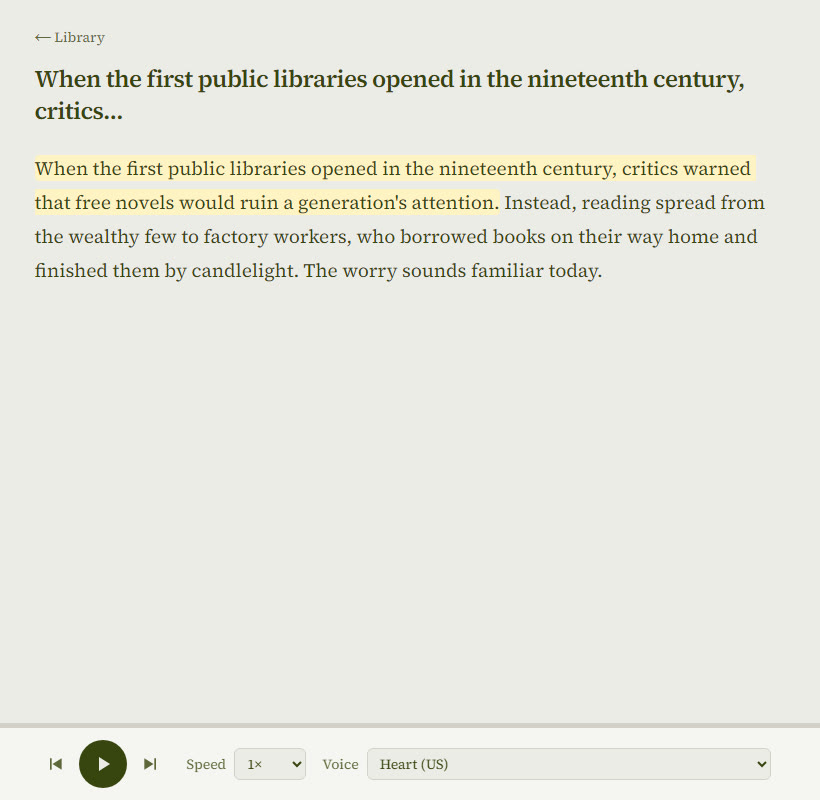
The reader marks each sentence

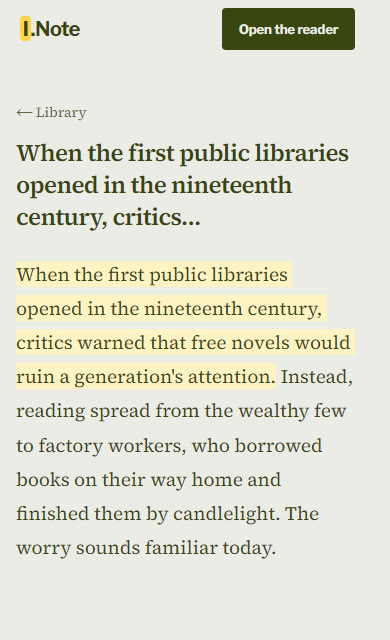
The sentence being read sits in pale yellow, the word in a stronger yellow, and the page scrolls with the voice.

  • Previous and next sentence buttons
  • Speed and voice in the bar below
  • Your place saved when you pause
See what is free
The HighlightNote reader: an article with one sentence marked in yellow and the player bar with speed and voice

Questions

Anything else, write to us.

Email us
The HighlightNote reader on a phone, the current sentence marked in yellow

Is HighlightNote free?

Yes. Device voices and the Kokoro voice cost nothing, with no time limit, and need no account. Pro adds premium voices and more AI tools for $19.99 a month or $89 a year, with a 7-day free trial and no card needed.

What can the reader open?

Web page links, PDF files up to 4 MB, and any text you paste in.

Does HighlightNote need an account?

No. Without one, your documents stay in this browser. Sign in with your email to keep your library on every device.

How fast can HighlightNote read?

Eight speeds from 0.75x to 3x. You can change the speed while it plays.

Does the reader keep my place?

Yes. Each document keeps its place, so play carries on from that sentence.

Does HighlightNote work on a phone?

Yes, in a modern mobile browser. Word-by-word marking works best in Chrome and Safari.